创建 UI 皮肤
在继续之前,你应该先阅读模组页面
要添加 UI 皮肤模组(是的,UI 皮肤只是另一种类型的模组),你所需要做的就是将你的图像添加到 Images/Skins/MyCoolSkinExample 下,并将模组启用为永久视觉模组。
游戏将识别皮肤,并允许你在选项菜单中选择它。
就像地形集一样,UI 皮肤可用于改变 Unciv 的外观。请注意,UI 皮肤不支持自定义图标和字体,并且并非每个 UI 元素都可以自定义。
我们为每个皮肤图像使用所谓的 9.png(或 Ninepatch)文件,因为 UI 元素需要一种基于游戏窗口大小和分辨率进行调整的方法。Ninepatch 文件可以通过以特定方式在你的自定义图像周围添加黑色像素来手动创建,或者使用 Android Studio 的 Draw 9-patch 工具或 romannurik 的这个工具等。你也可以检查你喜欢的图像创建工具本身是否支持 nine patches 以更容易地生成它们。
皮肤图像可以是灰度级的,稍后通过在 skinConfig 中修改 tint 在游戏中着色,或者直接在图像中着色。直接着色图像时,重要的是将 UI 元素的 tint 设置为白色。请注意,由于 libgdx 的技术限制,不支持可平铺的 ninepatches 和具有多个拉伸区域的 ninepatches。
有 6 种基本形状可以放置在 Images/Skins/MyCoolSkinExample 文件夹中:
- checkbox
- checkbox-pressed
- rectangleWithOutline
- roundedEdgeRectangle
- select-box
- select-box-pressed
这些形状在整个 Unciv 中使用,可以替换以一次更改许多 UI 元素的外观。要仅更改一个特定元素,请使用下面的表格在 Images/Skins/MyCoolSkinExample 内使用指定名称在指定目录创建图像。有关示例文件结构,请参见下图。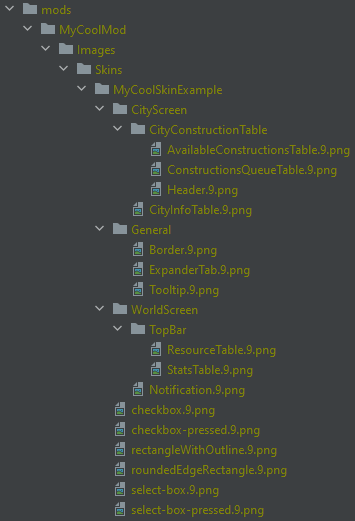
限制
- 由于多种状态而改变颜色的 UI 元素不能根据其状态使用 tint 给出多种颜色
- 直接着色图像时,将 UI 元素的 tint 设置为白色会覆盖这些状态
- 由于 libgdx 的技术限制,不支持可平铺的 ninepatches 和具有多个拉伸区域的 ninepatches
可用的 UI 元素
| 目录 | 名称 | 默认形状 | 图像 |
|---|---|---|---|
| AnimatedMenu/ | Button | roundedEdgeRectangleMid | |
| CityScreen/ | CityPickerTable | roundedEdgeRectangle | |
| CityScreen/CitizenManagementTable/ | AvoidCell | null | |
| CityScreen/CitizenManagementTable/ | FocusCell | null | |
| CityScreen/CitizenManagementTable/ | ResetCell | null | |
| CityScreen/CityConstructionTable/ | AvailableConstructionsTable | null | |
| CityScreen/CityConstructionTable/ | ConstructionsQueueTable | null | |
| CityScreen/CityConstructionTable/ | Header | null | |
| CityScreen/CityConstructionTable/ | PickConstructionButton | null | |
| CityScreen/CityConstructionTable/ | PickConstructionButtonSelected | null | |
| CityScreen/CityConstructionTable/ | QueueEntry | null | |
| CityScreen/CityConstructionTable/ | QueueEntrySelected | null | |
| CityScreen/CityScreenTileTable/ | Background | null | |
| CityScreen/CityScreenTileTable/ | InnerTable | null | |
| CityScreen/CityStatsTable/ | Background | null | |
| CityScreen/CityStatsTable/ | InnerTable | null | |
| CityScreen/ConstructionInfoTable/ | Background | null | |
| CityScreen/ConstructionInfoTable/ | SelectedConstructionTable | null | |
| CivilopediaScreen/ | EntryButton | null | |
| DiplomacyScreen/ | LeftSide | null | |
| DiplomacyScreen/ | RightSide | null | |
| DiplomacyScreen/ | SelectedCiv | null | |
| General/ | AnimatedMenu | roundedEdgeRectangle | |
| General/ | Border | null | |
| General/ | DisabledBox | null | |
| General/ | ExpanderTab | null | |
| General/ | HealthBar | null | |
| General/ | KeyCapturingButton | roundedEdgeRectangleSmall | |
| General/ | TabbedPager | null | |
| General/ | Tooltip | roundedEdgeRectangle | |
| General/Popup/ | Background | null | |
| General/Popup/ | InnerTable | null | |
| LanguagePickerScreen/ | LanguageTable | null | |
| LoadGameScreen/ | BottomTable | null | |
| LoadGameScreen/ | TopTable | null | |
| MainMenuScreen/ | Background | null | |
| MainMenuScreen/ | MenuButton | roundedEdgeRectangle | |
| MainMenuScreen/ | Version | roundedEdgeRectangle | |
| MapEditor/MapEditorToolsDrawer/ | Handle | null | |
| ModManagementOptions/ | ExpanderTab | null | |
| ModManagementScreen/ | BottomTable | null | |
| ModManagementScreen/ | TopTable | null | |
| MultiplayerScreen/ | BottomTable | null | |
| MultiplayerScreen/ | TopTable | null | |
| NewGameScreen/ | BottomTable | null | |
| NewGameScreen/ | GameOptionsTable | null | |
| NewGameScreen/ | MapOptionsTable | null | |
| NewGameScreen/ | PlayerPickerTable | null | |
| NewGameScreen/ | TopTable | null | |
| NewGameScreen/NationTable/ | Background | null | |
| NewGameScreen/NationTable/ | BorderTable | null | |
| NewGameScreen/NationTable/ | RightInnerTable | null | |
| NewGameScreen/NationTable/ | Title | null | |
| NewGameScreen/PlayerPickerTable/ | PlayerTable | null | |
| NotificationScroll/ | OneTimeNotificationColor | "#fceea8" | |
| OverviewScreen/DiplomacyOverviewTab/ | CivTable | null | |
| OverviewScreen/NotificationLog/ | HighlightColor1 | "#f0ead6" | |
| OverviewScreen/NotificationLog/ | HighlightColor2 | "#f5c993" | |
| OverviewScreen/NotificationOverviewTable/ | Notification | roundedEdgeRectangle | |
| OverviewScreen/ReligionOverviewTab/ | BeliefDescription | null | |
| OverviewScreen/TradesOverviewTab/ | OffersTable | null | |
| OverviewScreen/UnitOverviewTab/ | UnitSupplyTable | null | |
| PlayerReadyScreen/ | Background | null | |
| PolicyScreen/ | PolicyBranchAdoptButton | roundedEdgeRectangleSmall | |
| PolicyScreen/ | PolicyBranchAdoptButtonBorder | roundedEdgeRectangleSmall | |
| PolicyScreen/ | PolicyBranchBackground | rectangleWithOutline | |
| PolicyScreen/ | PolicyBranchBackgroundBorder | rectangleWithOutline | |
| PolicyScreen/ | PolicyBranchHeader | rectangleWithOutline | |
| PolicyScreen/ | PolicyBranchHeaderBorder | rectangleWithOutline | |
| PolicyScreen/Colors/ | BranchBGAdopted | 50,45,5 | |
| PolicyScreen/Colors/ | BranchBGCompleted | 255,205,0 | |
| PolicyScreen/Colors/ | BranchBGNotAdopted | 5,45,65 | |
| PolicyScreen/Colors/ | BranchHeaderBG | 47,90,92 | |
| PolicyScreen/Colors/ | BranchLabelAdopted | 150,70,40 | |
| PolicyScreen/Colors/ | BranchLabelNotPickable | 0xffffff7f | |
| PolicyScreen/Colors/ | BranchLabelPickable | WHITE | |
| PolicyScreen/Colors/ | ButtonBGAdopted | 1,17,19 | |
| PolicyScreen/Colors/ | ButtonBGAdoptedSelected | 1,17,19 | |
| PolicyScreen/Colors/ | ButtonBGNotPickable | 20,20,20 | |
| PolicyScreen/Colors/ | ButtonBGNotPickableSelected | 20,20,20 | |
| PolicyScreen/Colors/ | ButtonBGPickable | 32,46,64 | |
| PolicyScreen/Colors/ | ButtonBGPickableSelected | 37,87,82 | |
| PolicyScreen/Colors/ | ButtonIconAdopted | GOLD | |
| PolicyScreen/Colors/ | ButtonIconAdoptedSelected | GOLD | |
| PolicyScreen/Colors/ | ButtonIconNotPickable | 0xffffff33 | |
| PolicyScreen/Colors/ | ButtonIconNotPickableSelected | 0xffffff33 | |
| PolicyScreen/Colors/ | ButtonIconPickable | WHITE | |
| PolicyScreen/Colors/ | ButtonIconPickableSelected | WHITE | |
| PromotionScreen/ | PromotionButton | roundedEdgeRectangleMid | |
| PromotionScreen/ | PromotionButtonBorder | roundedEdgeRectangleMidBorder | |
| TechPickerScreen/ | Background | null | |
| TechPickerScreen/ | BottomTable | null | |
| TechPickerScreen/ | CurrentTechColor | 72, 147, 175 | |
| TechPickerScreen/ | QueuedTechColor | 72, 462, 43*2 | |
| TechPickerScreen/ | ResearchableTechColor | 28, 170, 0 | |
| TechPickerScreen/ | ResearchedFutureTechColor | 127, 50, 0 | |
| TechPickerScreen/ | ResearchedTechColor | 255, 215, 0 | |
| TechPickerScreen/ | TechButtonIconsOutline | roundedEdgeRectangleSmall | |
| VictoryScreen/ | CivGroup | roundedEdgeRectangle | |
| WorldScreen/ | AirUnitTable | null | |
| WorldScreen/ | BattleTable | null | |
| WorldScreen/ | Notification | roundedEdgeRectangle | |
| WorldScreen/ | PickTechButton | roundedEdgeRectangle | |
| WorldScreen/ | TileInfoTable | null | |
| WorldScreen/ | TutorialTaskTable | null | |
| WorldScreen/ | UnitTable | roundedEdgeRectangleMid | |
| WorldScreen/CityButton/ | AirUnitTable | roundedEdgeRectangleSmall | |
| WorldScreen/CityButton/ | AirUnitTableBorder | roundedEdgeRectangleSmall | |
| WorldScreen/CityButton/ | DefenceTable | roundedTopEdgeRectangleSmall | |
| WorldScreen/CityButton/ | DefenceTableBorder | roundedTopEdgeRectangleSmallBorder | |
| WorldScreen/CityButton/ | IconTable | roundedEdgeRectangleMid | |
| WorldScreen/CityButton/ | IconTableBorder | roundedEdgeRectangleMidBorder | |
| WorldScreen/CityButton/ | InfluenceBar | null | |
| WorldScreen/Minimap/ | Background | null | |
| WorldScreen/Minimap/ | Border | null | |
| WorldScreen/NextTurn/ | ProgressBar | null | |
| WorldScreen/NextTurn/ | ProgressColor | FOREST | |
| WorldScreen/TopBar/ | LeftAttachment | roundedEdgeRectangle | |
| WorldScreen/TopBar/ | ResourceTable | null | |
| WorldScreen/TopBar/ | RightAttachment | roundedEdgeRectangle | |
| WorldScreen/TopBar/ | StatsTable | null | |
| WorldScreenMusicPopup/TrackList/ | Down | null | |
| WorldScreenMusicPopup/TrackList/ | Over | null | |
| WorldScreenMusicPopup/TrackList/ | Up | null |
SkinConfig
skinConfig 类似于 tilesetConfig,可用于定义 unciv 使用的不同颜色和形状。
要为你的皮肤创建配置,你只需要在 jsons/Skins/ 下创建一个新的 .json 文件。只需创建一个 .txt 文件并将其重命名为 MyCoolSkinExample.json。如果你想更改它们,你只需要添加内容。否则将使用默认值。
这是下面将解释的此类配置文件的示例:
{
    "baseColor": {"r":1,"g":0,"b":0,"a":1},
    "defaultVariantTint": {"r":1,"g":1,"b":1,"a":1},
    "skinVariants": {
        "MainMenuScreen/MenuButton": {
            "image": "MyCoolNewDesign",
            "foregroundColor": {"r": 0, "g": 0, "b": 1, "a": 1},
            "iconColor": {"r": 0, "g": 1, "b": 0, "a": 1}
        },
        "TechPickerScreen/TechButton": {
            "image": "MyCoolNewDesign",
            "alpha": 0.7
        },
        "WorldScreen/TopBar/ResourceTable": {
            "alpha": 0.8
        },
        "WorldScreen/UnitTable": {
            "tint": {"r": 1, "g": 0, "b": 0},
            "image": "WorldScreen/TopBar/ResourceTable",
            "alpha": 0.4
        },
        "WorldScreen/Minimap/Background": {
            "tint": {"r": 0.2, "g": 0.4, "b": 0.45, "a": 1}
        }
    }
}
baseColor
用标准化 RGBA 值定义的颜色。默认值:{"r": 0, "g": 0.251, "b": 0.522, "a": 0.749}
定义 unciv 在大多数 UI 元素中使用的默认颜色
fallbackSkin
一个字符串。默认值:"Minimal"。
如果在此皮肤中未找到图像或未指定图像,则应使用的另一个皮肤的名称。 设置为 null 以禁用回退。
defaultVariantTint
用标准化 RGBA 值定义的颜色。默认值:null
如果未在 skinVariant 中明确指定,所有 skinVariants 应该使用的 tint。 如果你主要使用彩色图像,请将其设置为白色({"r": 1, "g": 1, "b": 1, "a": 1})以获得 正确的颜色。
skinVariants
一个将字符串映射到 SkinElement 的字典。默认值:空
这些变体可用于为指定的 UI 元素定义不同的图像、tint 和/或 alpha。用于标识 UI 元素的字符串可以通过将名称附加到目录从上面的表格中获取。
| 目录             | 名称          |
|-----------------------|---------------|
| WorldScreen/          | Notification  | -> WorldScreen/Notification
| WorldScreen/TopBar/   | StatsTable    | -> WorldScreen/TopBar/StatsTable
image
图像的路径。如果给出了像 MyCoolNewDesign 这样的名称,则文件预期位于 Images/Skins/MyCoolSkinExample 文件夹内,与 6 种基本形状一起。图像路径也可以是另一个 ui 元素,如 WorldScreen/TopBar/ResourceTable,以便其他元素可以重用图像。
tint
用标准化 RGBA 值定义的颜色。默认值:null
此 UI 元素应该获得的 tint。作为图像顶部的 tint 应用。这意味着如果 图像是有色的并且 tint 不是白色的,tint 颜色将与图像颜色合并,而不是覆盖它。
alpha
一个浮点值。默认值:null
此 UI 元素应该具有的 alpha。如果指定,则覆盖 tint 的 alpha 值。
foregroundColor
用标准化 RGBA 值定义的颜色。默认值:null
此 UI 元素应该用于其字体和图标的颜色。要对图标和字体进行不同的着色,请使用 iconColor 附加到此。
iconColor
用标准化 RGBA 值定义的颜色。默认值:null
此 UI 元素应该用于其图标的颜色。如果指定,则覆盖图标的 foregroundColor。